UZ mark
The core Urban Zoo mark. Use by itself, without supporting text.
1024px, transparent
How to present the Urban Zoo brand and our Gamechanger, Streamline and Teamstore product brands.
Urban Zoo
Urban Zoo is a sports technology company.
These guidelines show how to best present our core Urban Zoo brand and separate product brands when creating any content that represents the company.
When first introducing the company, Urban Zoo should be written or spoken in full. For repeated use the shorter UZ can be used.
Everyday use
Most Urban Zoo material is not made by designers. It is emails, proposals and slide decks put together by the people who talk to clients.
Everything below is detail. Open what you need.
Figtree is a free Google font, so every tool can use it. Only the route differs.
Google Slides and Docs. Font dropdown → More fonts → search Figtree → OK. It stays in your font list from then on, and anyone you share with sees it, because Google renders the font rather than relying on their machine.
Keynote. Install it on your Mac first. At
https://fonts.google.com/specimen/Figtree, click Get font, then Download
all. Unzip, select the .ttf files, double-click, then Install. It then
appears in every app on your Mac.
HTML. Load it from Google. One line in the head:
<link href="https://fonts.googleapis.com/css2?family=Figtree:wght@400;700;800&display=swap" rel="stylesheet">
Then font-family: Figtree, Arial, sans-serif. The
CSS variables file has it ready to paste.
Email. The recipient's mail app decides what renders, and almost none have Figtree. Use Arial in Gmail, which is the "Sans Serif" option, and in Mailchimp. Mailchimp will offer you a web font: resist it. Apple Mail shows it, Gmail and Outlook do not, and the campaign looks like two different brands depending on who opened it.
Editable files going elsewhere. A Google file downloaded as .pptx, or a
.key sent to someone without Figtree installed, substitutes the font on their
machine. If that is where something is heading, set it in Arial from the start.
Exporting to PDF is always safe - the font travels with the file.
| Where | Use |
|---|---|
| Google Slides and Docs | Figtree |
| Keynote | Figtree, once installed |
| HTML, websites and apps | Figtree |
| Files exported as PDF | Figtree |
| Gmail, Mailchimp, any email | Arial |
| Editable files sent to Office | Arial |
Body text at 11pt or above in documents, 18pt or above on slides.
Download from the logo repository.
The PNGs have transparent backgrounds, so they sit on any colour without a white box round them.
Which version? Full colour on white or very light backgrounds. White on anything dark, photographic, or a block of brand colour.
Do not stretch a logo. Drag from a corner handle and it keeps its proportions.
In Google Docs and Slides, open the colour picker, click + under Custom, and paste the hex code. Every swatch on the palette has a copy button.
RGB values are there for anything wanting three numbers instead. CMYK is for print only.
Set them in Figtree. A deck is presented, not passed around, so the font holds up: presenting live keeps it, and so does exporting to PDF.
.key sent to
someone without Figtree will substitute.Export to PDF if the deck is being sent rather than presented. It fixes fonts, spacing and colour in place.
A few things that make a deck look like ours:
Arial, Nearly Black text, and the UZ mark at around 120px wide. Coloured text, background images and large logos all cause problems in email clients, and many recipients see them stripped out anyway.
Upload logos at twice the size you want them shown. A logo displayed 200px wide needs a 400px file, or it looks soft on a phone. 512 covers most email uses, 1024 for a full-width header.
Give the logo alt text. Most email clients block images until the reader allows them, so a good number of people see the alt text and nothing else. "Urban Zoo" is enough.
Never put words inside an image. Same reason: if images are blocked, your headline goes with them.
Use hex codes for background and text colours.
Ask Hayden Evans. That includes anything going to print, anything client-facing at scale, and any case where following this page would produce something that looks wrong.
Our products

Written: Gamechanger® for general or repeated use. UZ Gamechanger® can also be used when introducing the brand, but should be written in full sparingly.
Our digital sports platform Gamechanger® was given its name as it provides a truly game changing experience for sports clubs and organisations.
Gamechanger® gives sports clubs the opportunity to use a platform built from the ground up with their needs at its heart, rather than an off the shelf solution.
Solidly architected, cloud hosted, class leading user experiences across web and app define the very meaning of being a Gamechanger®. It is a brand and ethos we at Urban Zoo are proud of.

Written: Streamline for general or repeated use. UZ Streamline should be used when introducing the brand.
UZ Streamline is the name of our video streaming platform, providing live and VOD streaming.
The Streamline brand was named as such because the product has been developed to allow clubs to improve their workflow, increasing the flexibility of publishing tools and options whilst requiring fewer suppliers.

Written: Teamstore for general or repeated use. UZ Teamstore should be used when introducing the brand.
UZ Teamstore is the name of our ecommerce product. It complements other UZ products, sharing the ethos of being a best in class yet cost effective solution.
The Teamstore name suggests the identity and pride fans have in their club's colours. This is their official team's store.
Our logo
Our core logo is the main authoritative stamp of Urban Zoo.
As a confident brand, the Urban Zoo logo is intended to be used by itself, without supporting text or wordmarks.
Full colour on white and very light backgrounds. White, without a background, on dark or saturated backgrounds and over photography.


On Warm Grey, use the full-colour or Nearly Black mark rather than white. The white mark disappears into it.
Keep clear space around the logo equal to a quarter of the height of the UZ mark. Nothing else sits inside that boundary: no type, no other logos, no busy detail in a photograph behind it.
Because the UZ mark appears in every lockup, the same rule works for all of them. It scales with the logo, so it holds at any size.
Below these sizes the wordmark stops being legible.
| On screen | In print | |
|---|---|---|
| UZ mark on its own | 24px wide | 10mm wide |
| Gamechanger, Streamline or Teamstore lockup | 120px wide | 30mm wide |
Where a logo has to go smaller than this, use the UZ mark on its own rather than shrinking a lockup past the point where the product name can be read.
Stretched. The logo should always be scaled uniformly.
Recoloured. When used by itself for UZ, the logo should always be UZ Purple or white outline. Exceptions to this rule are when the logo is part of a UZ sub-brand, e.g. UZ Streamline.
Colour outline. The only outline use of the UZ logo should be white.
No keyline border. The UZ logo should always contain the keyline border.
Downloads
9 lockups. For Slides, Docs, Keynote and email use PNG. SVG is for developers and designers.
Not sure which? The UZ mark in full colour on a light background, or the white version on anything dark.
The core Urban Zoo mark. Use by itself, without supporting text.
For dark, saturated or photographic backgrounds.
Full-colour lockup for white and very light backgrounds.
Use the name on its own only where the UZ mark already appears on the same slide, page or email. Otherwise use the full lockup.
For dark, saturated or photographic backgrounds.
Use the name on its own only where the UZ mark already appears on the same slide, page or email. Otherwise use the full lockup.
Full-colour lockup for white and very light backgrounds.
Use the name on its own only where the UZ mark already appears on the same slide, page or email. Otherwise use the full lockup.
For dark, saturated or photographic backgrounds.
Use the name on its own only where the UZ mark already appears on the same slide, page or email. Otherwise use the full lockup.
Full-colour lockup for white and very light backgrounds.
Use the name on its own only where the UZ mark already appears on the same slide, page or email. Otherwise use the full lockup.
For dark, saturated or photographic backgrounds.
Use the name on its own only where the UZ mark already appears on the same slide, page or email. Otherwise use the full lockup.
Our 'spark'. Rotate, extrude, fade or break it up. The usage rules are deliberately open.
Colours
Copy any value straight from a swatch. Hex is what you want almost everywhere on screen. CMYK is for print only.
was “Gamechanger Purple”
Darker version for small text:
Darker version for small text:
Dev note: the full palette is available as structured data - tokens.json, in Resources.
UZ Purple is the primary brand colour. It works for text on white or cool grey, and takes white type when used as a background.
Streamline Pink and Teamstore Teal identify their products. Both are best kept for headings, fills and graphics rather than long stretches of body copy.
Warm Grey is a background and fill colour, not a text colour. On a warm grey background use Nearly Black, because white, pink and teal all disappear into it.
Cool Grey is a softer alternative to pure white for page backgrounds.
Nearly Black is the default for body copy in place of pure black. Easier on the eye over long stretches.
When a post is about a client rather than about us, these background rules bend - see Showcasing client work.
If you are unsure whether two colours will work together, use the checker below. Pick a text colour and a background and it will tell you whether the pairing is readable.
Colour
Pick a text colour and a background from the palette.
Large heading
Body copy at normal size, the kind most of a page is set in.
Fonts
Our UZ font family is Figtree.
Figtree can be used directly in Google Docs and Slides: add it once from the font menu and it stays available. Use Arial for email, where the recipient's mail app decides what actually renders. Everyday use covers this in full.
Figtree
ABCDEFGHIJKLMNOPQRSTUVWXYZ
abcdefghijklmnopqrstuvwxyz
1234567890 & ? ! @ # £ % ( ) – ’ “ ”
Get Figtree from Google Fonts Open Font License. Free for web and print use.
Regular · 400
The quick brown fox jumps over the lazy dog 1234567890
Body copy and captions.
Bold · 700
The quick brown fox jumps over the lazy dog 1234567890
Sub-headings and emphasis within body copy.
Extra Bold · 800
The quick brown fox jumps over the lazy dog 1234567890
Section headings and display type.
| Weight | Value | Used for |
|---|---|---|
| Extra-Bold | 800 | Section headings and display type |
| Bold | 700 | Sub-headings and emphasis within body copy |
| Regular | 400 | Body copy and captions |
UZ bolt
Our UZ bolt is an indicator of the energy and inspiration we apply to all our products and services.
It is an integral part of our product logos, but can be used by itself for backgrounds, page breaks and other creative uses.
The usage guidelines for the bolt are deliberately open. You can rotate, extrude, fade and break it up to create patterns.
The only guidance is that whatever is created should be visually traceable back to our original bolt.
The bolt on its own is in the logo downloads.
When the bolt appears in a post about a client, see Showcasing client work for colouring it from their palette rather than ours.

Imagery
Any photography or imagery used alongside the Urban Zoo or associated product brands should meet the following criteria.
All imagery should have an authentic feel, showing real games, real fans and real experiences.
All imagery should give the viewer a sense of experience, quickly establishing the reality of the image and the context.
Imagery should reflect the diverse nature of the football family, ensuring that a single demographic is not overly used when using fans and players as a focal point of the image.







Showcasing client work
Our purple is usually too dominant for social and marketing posts about a client. Their colours are the point, and ours competing with them makes the post about us.
So when a client is the subject, large background areas and the bolt are open to being coloured from their palette instead of ours. This is a design decision, not a formula - use your judgement.
Two things to hold to.
The lockup stays ours. Backgrounds and the bolt take the client's colours; the logo follows the normal rules. It should read as us showing a client's work, not as the client's own content.
Take the calmer colour for the large areas. Let the product shot carry the loud one. Fill the background with the bold colour instead and it competes just as badly as the purple did.
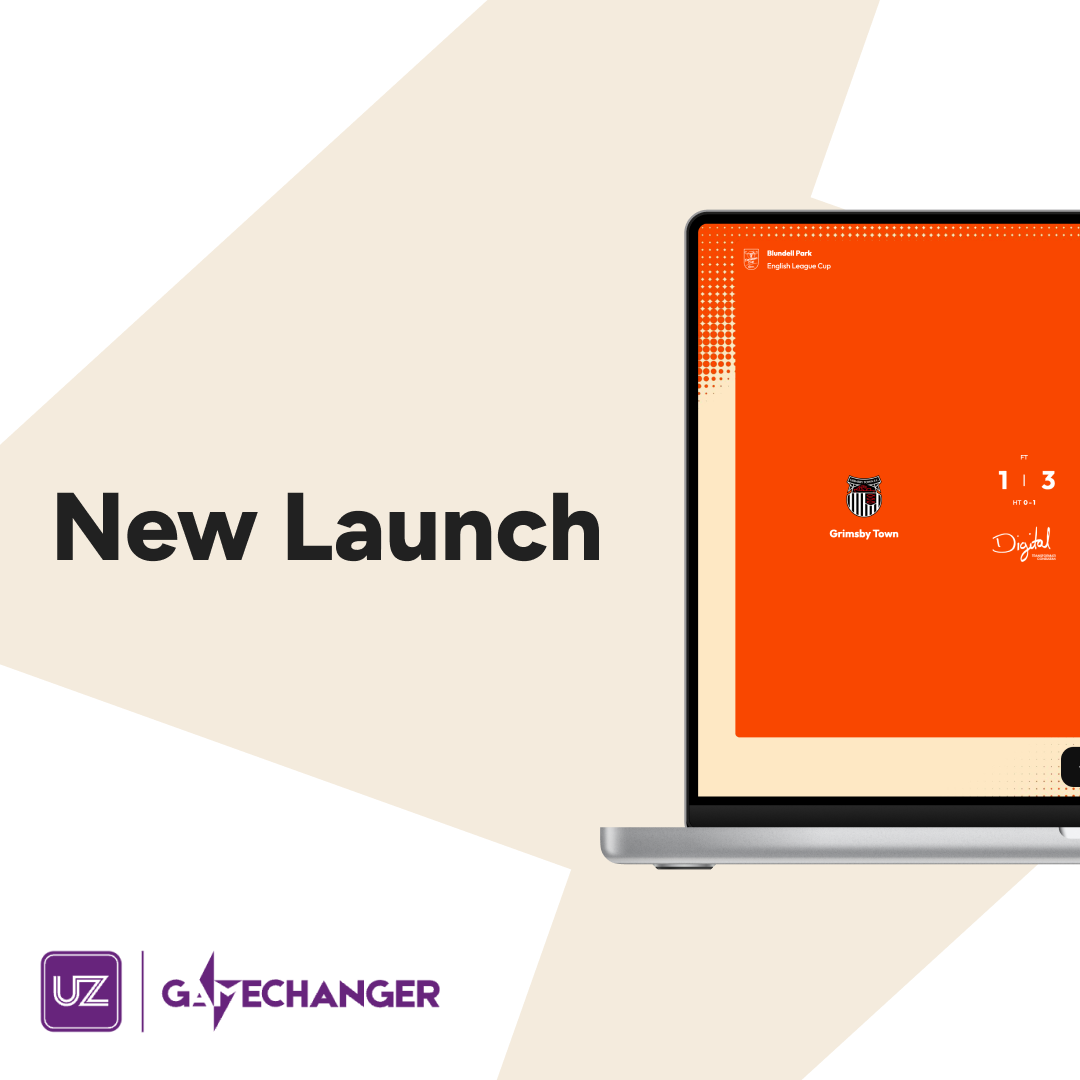
Text on top is White or Nearly Black - whichever passes contrast, not whichever you are used to. On UZ Purple the answer is almost always white. On client colours it usually is not: white on Blackpool's tangerine is 2.4:1 and fails. Check it in Colour pairings before you commit to it.
When we are the subject - pitch decks, recruitment, corporate, product marketing that is not about a named client - the palette is yours as usual. Purple, white, cool grey or nearly black, whichever suits the piece.
Resources
Everything in one place. These files are generated from the same source as this page, so they are never out of step with what you see here.
Everyone
Every lockup plus the bolt, as SVG. For PNGs, use the logo downloads instead.
Everyone
This whole page as one file, with every image built in. Opens with no connection, so it travels well - email it out, or keep it for working somewhere with no network. Regenerated with every build, so the copy at this address is always current.
Developers only
Every colour, its print values and the type scale, as structured data.
Developers only
The palette as custom properties, generated from the same source.